Endpoint
The Endpoint interface is responsible for communication with the AAS from the outside, e.g. users or external applications.
An instance of FA³ST Service can serve multiple endpoints at the same time.
Endpoints will be synchronized, meaning if a FA³ST Service offers multiple endpoint such as HTTP(S) and OPC UA at the same time, changes done via one of the endpoints like updating a value is reflected in the other.
The following is an example of the relevant part of the configuration part comprising both an HTTP(S) and OPC UA endpoint
 1{
 2	"endpoints": [
 3		{
 4			"@class": "de.fraunhofer.iosb.ilt.faaast.service.endpoint.http.HttpEndpoint",
 5			"port": 443,
 6			"corsEnabled": true
 7		},
 8		{
 9			"@class": "de.fraunhofer.iosb.ilt.faaast.service.endpoint.opcua.OpcUaEndpoint",
10			"tcpPort": 8081
11		}
12	],
13	// ...
14}
Generic Configuration
All endpoint implementations share the following common configuration properties.
Name |
Allowed Value |
Description |
Default Value |
|---|---|---|---|
profiles |
List, allowed values: |
The AAS Service Profiles that the endpoint should support. |
(empty, meaning all profiles are supported) |
HTTP
The HTTP Endpoint allows accessing data and execute operations within the FA³ST Service via REST-API. In accordance to the specification, only HTTPS is supported since AAS v3.0. The HTTP Endpoint is based on the document Details of the Asset Administration Shell - Part 2: Application Programming Interfaces v3.0 and the corresponding OpenAPI documentation v3.0.1.
Configuration
Name |
Allowed Value |
Description |
Default Value |
|---|---|---|---|
certificate |
The HTTPS certificate to use. |
self-signed certificate |
|
corsAllowCredentials |
Boolean |
Sets the |
false |
corsAllowedHeaders |
String (comma-separated list) |
Sets the |
* |
corsAllowedMethods |
String (comma-separated list) |
Sets the |
GET, POST, HEAD |
corsAllowedOrigin |
String |
Sets the |
* |
corsEnabled |
Boolean |
If Cross-Origin Resource Sharing (CORS) should be enabled. |
false |
corsExposedHeaders |
String (comma-separated list) |
Sets the |
|
corsMaxAge |
Long |
Sets the |
3600 |
hostname |
String |
The hostname to be used for automatic registration with registry. |
auto-detect (typically IP address) |
includeErrorDetails |
Boolean |
If set, stack traceis added to the HTTP responses incase of error. |
false |
port |
Integer |
The port to use. |
443 |
sniEnabled |
Boolean |
If Server Name Identification (SNI) should be enabled. |
true |
sslEnabled |
Boolean |
If SSL/HTTPS should be enabled. |
true |
 1{
 2	"endpoints": [ {
 3		"@class": "de.fraunhofer.iosb.ilt.faaast.service.endpoint.http.HttpEndpoint",
 4		"certificate": {
 5			"keyStoreType": "PKCS12",
 6			"keyStorePath": "C:\faaast\MyKeyStore.p12",
 7			"keyStorePassword": "changeit",
 8			"keyAlias": "server-key",
 9			"keyPassword": "changeit"
10		},
11		"corsAllowCredentials": false,
12		"corsAllowedHeaders": "X-Custom-Header",
13		"corsAllowedMethods": "GET, PUT, POST, PATCH, DELETE, HEAD",
14		"corsAllowedOrigin": "localhost",
15		"corsEnabled": true,
16		"corsExposedHeaders": "X-Custom-Header",
17		"corsMaxAge": 1000,
18		"hostname": "localhost",
19		"includeErrorDetails": true,
20		"port": 443,
21		"profiles": [ "AAS_REPOSITORY_FULL", "AAS_FULL", "SUBMODEL_REPOSITORY_FULL", "SUBMODEL_FULL" ],
22		"sniEnabled": true,
23		"sslEnabled": true
24	} ],
25	// ...
26}
API
FA³ST Service supports the following APIs as defined by the OpenAPI documentation v3.0.1
Asset Administration Shell API
Submodel API
Asset Administration Shell Repository API
Submodel Repository API
Concept Description API
Asset Administration Shell Basic Discovery API
Serialization API
Description API
Additionally, FA³ST Service offers the following proprietary API calls:
HTTP Method |
URL Path |
Description |
Payload |
Response |
|---|---|---|---|---|
GET |
/reset |
Resets the server which includes deleting all AASs, submodels, concept descriptions, files, asset connections, and pending operations. |
- |
|
POST |
/import |
Imports an AAS files in any supported data format. Set the |
The file to upload. |
|
Using HTTP PATCH
As the AAS specification is currently does not properly specify show HTTP PATCH requests are expected to work, FA³ST Service follows the well-established RFC 7386 JSON Merge Patch. In short, this means that as payload you can send a JSON document that only contains the properties of the original document you want to update. To delete elements set the value explicitely to null.
As a consequence, URLs for all different content modifiers, i.e. /$metadata, /$value, as well as the call without any modifiers, are redundant and provide exactly the same functionality in FA³ST Service.
Caution
Arrays in JSON objects can only be replaced, i.e. if you want to update a single element within an array you first need to get the current value of the array, modify the element to be updated and then send the whole array as part of the PATCH payload.
Invoking Operations
To invoke an operation, make a POST request according to this URL example: /submodels/{submodelId (base64-URL-encoded)}/submodel-elements/{idShortPath to operation}/invoke.
Tip
You can invoke operations asynchronuously by calling .../invoke-async instead of .../invoke in which case you get back a handleId instead of the result.
To monitor the execution state call .../operation-status/{handleId} and once finished you can get the result calling .../operation-results/{handleId} or .../operation-results/{handleId}/$value for the ValueOnly serialization.
Depending on the in & inoutput arguments, the payload should look like this.
 1{
 2	"inputArguments": [ {
 3		"value": {
 4			"modelType": "Property",
 5			"value": "4",
 6			"valueType": "xs:int",
 7			"idShort": "in"
 8		},
 9		// additional input arguments
10	} ],
11	"inoutputArguments": [ {
12		"value": {
13			"modelType": "Property",
14			"value": "original value",
15			"valueType": "xs:string",
16			"idShort": "note"
17		},
18		// additional inoutput arguments
19	} ],
20	"clientTimeoutDuration": "PT10S"   // ISO8601 duration, here: 10 seconds
21}
An easier, or at least less verbose way, of invoking operations is by using the ValueOnly serialization.
For this, add /$value to the end of the URL, i.e. resulting in either .../invoke/$value or .../invoke-async/$value.
The payload will be simplified and look similar to this
1{
2	"inputArguments": {
3		"in": 4
4	},
5	"inoutputArguments": {
6		"note": "original value"
7	},
8	"clientTimeoutDuration": "PT10S"
9}
OPC UA
The OPC UA Endpoint allows accessing data and execute operations within the FA³ST Service via OPC UA.
Unfortunately, there is currently no official mapping of the AAS API to OPC UA for AAS v3.0. Nevertheless, FA³ST Service decided to still provide an OPC UA endpoint even though it is not (yet) standard-compliant. This implementation is based on the OPC UA Companion Specification OPC UA for Asset Administration Shell (AAS) which defines a mapping between AAS and OPC UA for AAS v2.0 enriched with some custom adjustments and extensions to be used with AAS v3.0.
The OPC UA Endpoint is built with the Prosys OPC UA SDK for Java which means in case you want to compile the OPC UA Endpoint yourself, you need a valid license for the SDK (which you can buy here. For evaluation purposes, you also have the possibility to request an evaluation license. However, this is not necessary for using the OPC UA Endpoint we already provide a pre-compiled version that is used by default when building FA³ST Service from code. The developers of the Prosys OPC UA SDK have been so kind to allow us to publish that pre-compiled version as part of this open-source project under the condition that all classes related to their SDK are obfuscated.
Configuration Parameters
OPC UA Endpoint configuration supports the following configuration parameters
Name |
Allowed Value |
Description |
Default Value |
|---|---|---|---|
discoveryServerUrl |
String |
URL of the discovery server. |
|
secondsTillShutdown |
Integer |
The number of seconds the server waits for clients to disconnect |
2 |
serverCertificateBasePath |
String |
Path where the server application certificates are stored |
PKI/CA |
supportedAuthentications |
Anonymous |
List of supported authentication types |
Anonymous |
supportedSecurityPolicies |
NONE |
List of supported security policies |
NONE, |
tcpPort |
Integer |
The port to use for TCP |
4840 |
userMap |
Map<String, String> |
A map containing usernames and password. |
empty |
userCertificateBasePath |
String |
Path where the certificates for user authentication are saved |
USERS_PKI/CA |
Certificate Management
The path provided with the serverCertificateBasePath configuration property stores the server and client application certificates and contains the following subdirectories
/certs: trusted client certificates/crl: certificate revocation list for client certificates/issuers/certs: certificates of trusted CAs/issuers/crl: certificate revocation list for CA certificates/issuers/rejected: rejected CA certificates/private: certificates for the OPC UA server/rejected: unkown/rejected client certificates
To provision the OPC UA Endpoint to use an existing certificate for the server, save the certificate file as {serverCertificateBasePath}/private/Fraunhofer IOSB AAS OPC UA Server@{hostname}_2048.der and the private key as {serverCertificateBasePath}/private/Fraunhofer IOSB AAS OPC UA Server@{hostname}_2048.pem where {hostname} is the host name of your machine.
When an unkown client connects to the OPC UA Endpoint, the connection will be rejected and its client certificate will be stored in /rejected.
To trust the certificate of a client and allow the connection, move the file to /certs.
The path provided with the userCertificateBasePath configuration property stores the user certificates and contains the following subdirectories
/certs: trusted user certificates/crl: certificate revocation list for user certificates/issuers/certs: certificates of trusted CAs/issuers/crl: certificate revocation list for CA certificates/issuers/rejected: rejected CA certificates/rejected: unkown/rejected client certificates
Similar to the client certificates, unknown user certificates are stored in /rejected the first time a new certificate is encountered.
To trust this certificate, simply move it to /certs.
and userCertificateBasePath point to directories where the corresponding certificates are stored.
These directories contain the following subdirectories:
 1{
 2	"endpoints": [ {
 3			"@class": "de.fraunhofer.iosb.ilt.faaast.service.endpoint.opcua.OpcUaEndpoint",
 4			"discoveryServerUrl" : "opc.tcp://localhost:4840",
 5			"profiles": [ "AAS_REPOSITORY_FULL", "AAS_FULL", "SUBMODEL_REPOSITORY_FULL", "SUBMODEL_FULL" ],
 6			"userMap" : {
 7			  "user1" : "secret"
 8			},
 9			"secondsTillShutdown" : 5,
10			"serverCertificateBasePath" : "PKI/CA",
11			"supportedSecurityPolicies" : [ "NONE", "BASIC256SHA256", "AES128_SHA256_RSAOAEP" ],
12			"supportedAuthentications" : [ "Anonymous", "UserName" ]
13			"tcpPort" : 18123,
14			"userCertificateBasePath" : "USERS_PKI/CA",
15	} ],
16	//...
17}
OPC UA Client Libraries
To connect to the OPC UA Endpoint, you need an OPC UA Client. Here are some example libraries and tools you can use:
Eclipse Milo: Open Source SDK for Java.
Unified Automation UaExpert: Free OPC UA test client (registration on website required for download).
Prosys OPC UA Browser: Free OPC UA test client (registration on website required for download).
Official Samples from the OPC Foundation: C#-based sample code from the OPC Foundation.
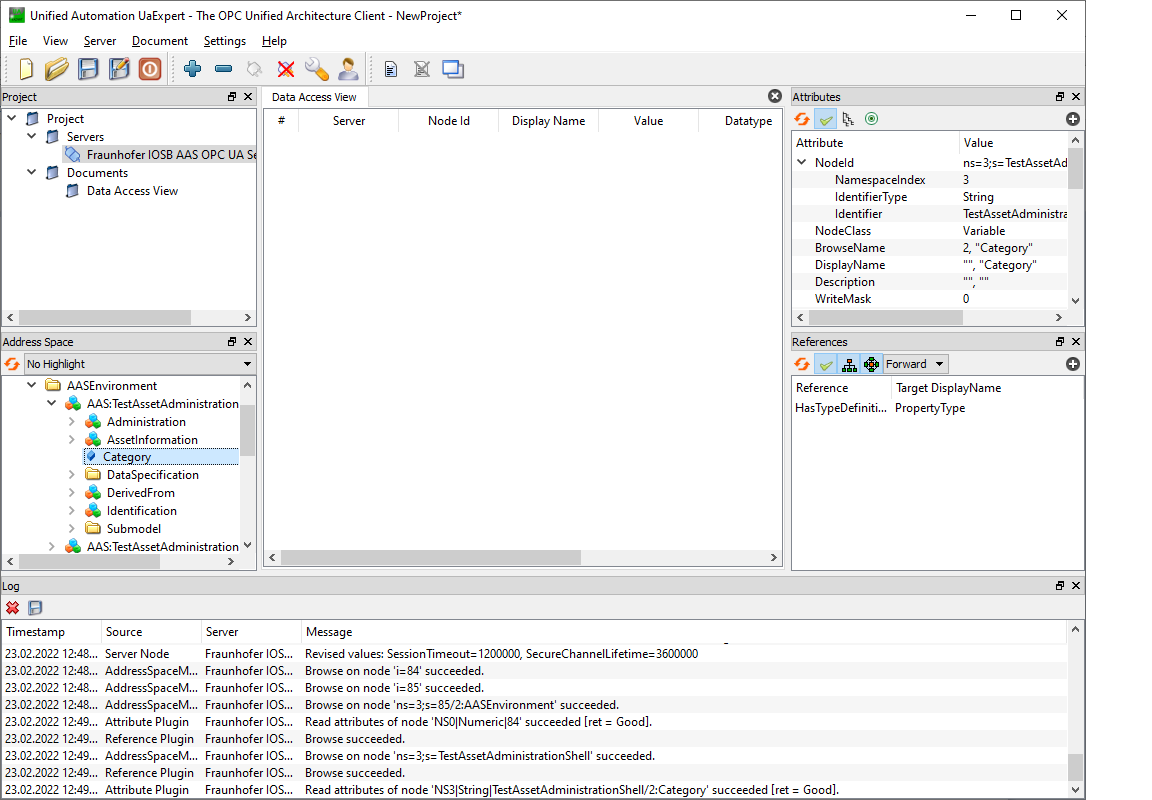
Screenshot showing UaExpert connected to a FA³ST Service via OPC UA Endpoint.
Datatype mapping
It’s necessary to map the AAS datatypes to OPC UA datatypes. In some cases, no corresponding datatype is available in OPC UA. These datatypes are mapped to String.
The mapping is as follows
AAS datatype |
OPC UA datatype |
Comment |
|---|---|---|
xs:string |
String |
|
xs:boolean |
Boolean |
|
xs:decimal |
String |
|
xs:integer |
String |
|
xs:double |
Double |
No distinction between +0.0 and -0.0 |
xs:float |
Float |
No distinction between +0.0 and -0.0 |
xs:date |
String |
|
xs:dateTime |
DateTime |
Converted to UTC, TZ offset is lost. |
xs:time |
String |
|
xs:gYear |
String |
|
xs:gMonth |
String |
|
xs:gDay |
String |
|
xs:gYearMonth |
String |
|
xs:gMonthDay |
String |
|
xs:duration |
String |
|
xs:byte |
SByte |
|
xs:short |
Int16 |
|
xs:int |
Int32 |
|
xs:long |
Int64 |
|
xs:unsignedByte |
Byte |
|
xs:unsignedShort |
UInt16 |
|
xs:unsignedInt |
UInt32 |
|
xs:unsignedLong |
UInt64 |
|
xs:positiveInteger |
String |
|
xs:nonNegativeInteger |
String |
|
xs:negativeInteger |
String |
|
xs:nonPositiveInteger |
String |
|
xs:hexBinary |
ByteString |
|
xs:base64Binary |
ByteString |
|
xs:anyURI |
String |
API
As stated, there is currently no official mapping of the AAS API to OPC UA for AAS v3.0 but FA³ST Service implements its proprietary adaption of the mapping for AAS v2.0.
Supported Functionality
Writing values for the following types
Property
Range
Blob
MultiLanguageProperty
ReferenceElement
RelationshipElement
Entity
Operations (OPC UA method calls). Exception: Inoutput-Variables are not supported in OPC UA.
Not (yet) Supported Functionality
Updating the model, i.e., adding new elements at runtime is not possible
Writing values for the following types
DataSpecifications
Qualifier
Category
ModelingKind
AASDataTypeDefXsd
Base64Binary
UnsignedInt
UnsignedLong
UnsignedShort
UnsignedByte